
In the last post, we learned how to perform a vCloud Availability 3.0 provider-side configuration. But before tenant-side configuration can be performed, replication policies must be created.
Replication policies are sets of rules that define and control the replication attributes on a vCD organization level. Typically, a replication policy enforces the following attributes:
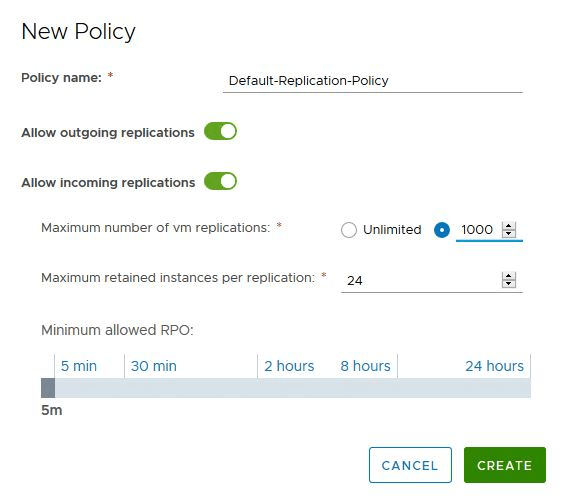
- Whether an organization can be used as a replication source.
- Whether an organization can be used as a replication destination.
- The minimum Recovery Point Objective (RPO) for an organization.
- The maximum number of retained snapshots per single virtual machine replication for an organization.
- The maximum number of virtual machine replications that can be created for an organization.
Note: A single replication policy can be assigned to multiple vCD organizations.
Create a Replication Policy
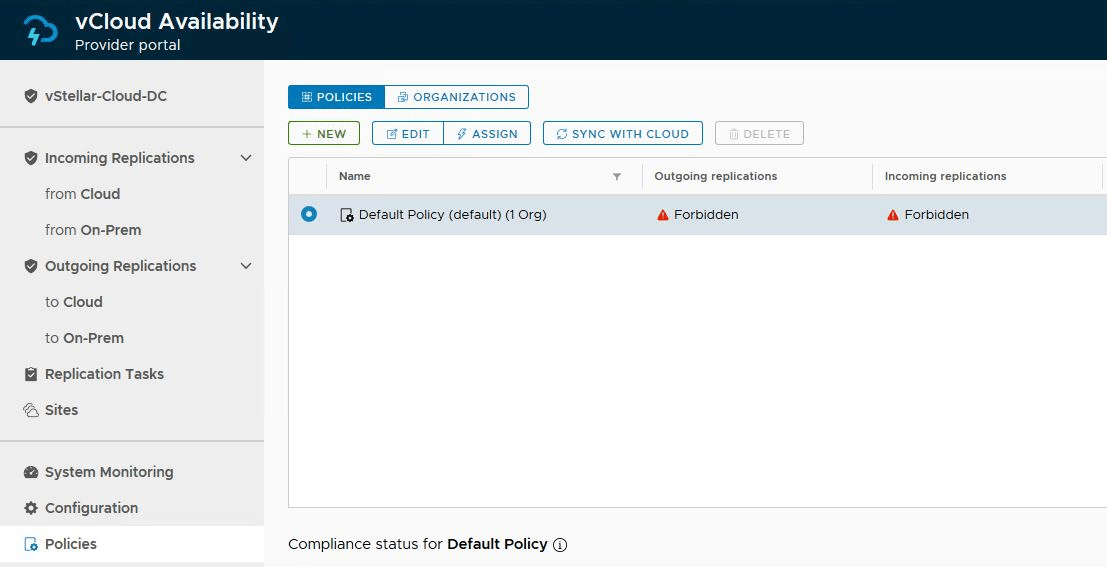
You can edit and use the default replication policy that comes with vCAV, or you can create custom ones.
To create a new policy, login to vCloud Availability Portal (https://<vcav-fqdn>ui/admin) via root user and navigate to Home > Policies and click on New
Specify a name for the policy, select the attributes that will be part of this policy, and click the Create button.
Select the newly created policy and click on the Assign button to associate this policy with vCD organizations.

Select the organization and click Assign.

Select the organization from the list.

The selected policy shows the number of orgs associated with the policy.

And that’s it for this post. In the next post of this series, we will learn how to perform tenant-side configuration.
I hope you enjoyed reading this post. Feel free to share this on social media if it’s worth sharing.